How to Start a YouTube Channel in 2026
Let’s get started on your YouTube journey!
Introduction
You’ve decided to dive into the world of YouTube? That’s exciting! Whether you want to share your passion build a personal brand or even turn your creativity into income starting a YouTube channel in 2026 is easier than ever. But where do you begin?
This guide is designed specifically for beginners, students, bloggers, aspiring creators or anyone curious about YouTube. No tech expertise required. The end of this tutorial you’ll know exactly how to create your channel, optimize it for success and upload your very first video with confidence.
Let’s get started on your YouTube journey!
Why This Matters
YouTube isn’t just a video platform anymore. It’s the second-largest search engine in the world. With over 2 billion monthly users the opportunities are massive. But here’s the many things for beginners make the same mistakes. They skip channel optimization, upload inconsistently or give up too early.
Following a proper setup process from day one gives you a huge advantage. You’ll avoid common pitfalls, build a professional-looking channel and set yourself up for long-term growth. Think of this as laying a strong foundation before building your house.
Things You Need Before Starting
Don’t worry you don’t need expensive equipment to begin. Here’s what you’ll need
- A Google/Gmail account (free to create)
- A smartphone or computer for recording and uploading
- Basic video editing app (many free options available)
- A clear idea of your channel’s topic or niche
- About 30-60 minutes of focused time
That’s it! You can always upgrade your gear later. Let’s focus on getting your channel live first.
Step-by-Step Tutorial
Step 1: Sign In to YouTube and Access Channel Creation
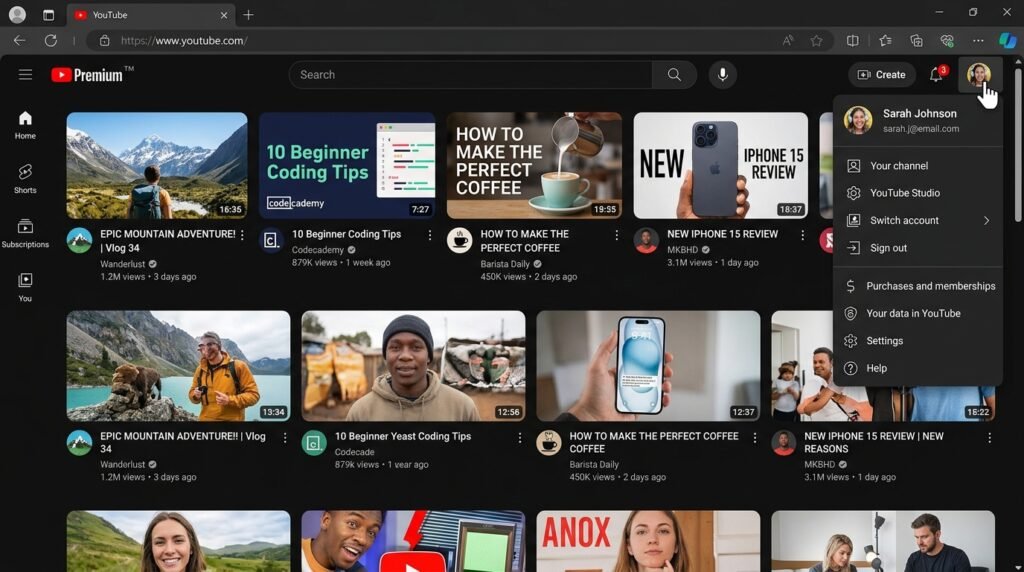
Head over to YouTube.com and make sure you’re signed in with your Google account. If you don’t have one, click “Sign In” and follow the prompts to create a free Gmail account.
Once logged in, click on your profile picture in the top-right corner. From the dropdown menu, select “Create a channel.” YouTube will ask if you want to create a personal channel or use a business name. For most beginners a personal channel works perfectly fine.
Step 2: Choose Your Channel Name and Handle
Your channel name is your brand identity. Choose something memorable, easy to spell and relevant to your content. You can use your real name a creative brand name or a combination.
Below your channel name you’ll see the option to set a “Handle” (your @username). This is what people will use to find and mention you. Make it consistent with your channel name if possible. For example, if your channel is “Cooking with Sarah” your handle could be @CookingWithSarah.
Don’t stress too much. You can change these later but it’s best to get them right from the start.

Step 3: Upload Your Channel Art and Profile Picture
First impressions matter! Your profile picture appears next to all your videos and comments. Use a clear headshot if you’re the face of your channel. A simple logo if you’re building a brand.
Channel art (the banner at the top) is your billboard. It should represent your channel’s theme and include your upload schedule if possible. YouTube recommends 2560 x 1440 pixels. Canva offers free YouTube banner templates if you need help designing one.
Click “Customize channel” → “Branding” to upload both images. Take your time here. This is what visitors see first!

Step 4: Write Your Channel Description
Your channel description tells viewers what your channel is about and why they should subscribe. You have 1,000 characters but the first 150 are most important. They show up in search results.
Start with a hook: What value do you provide? Then explain your content type, upload schedule, and who you’re creating for. Include relevant keywords naturally (like “cooking tutorials,” “tech reviews,” or “fitness tips”).
Example: “Welcome to Tech Simplified! I make easy-to-follow tech reviews and tutorials for beginners. New videos every Tuesday and Friday. Subscribe to stay updated!”
Go to “Customize channel” → “Basic info” to add this.

Step 5: Verify Your Account and Unlock Features
This step is crucial but often skipped. Verifying your phone number unlocks important features like:
- Custom thumbnails (eye-catching video covers)
- Videos longer than 15 minutes
- Live streaming capability
- Ability to appeal content ID claims
Go to YouTube Studio → Settings → Channel → Feature eligibility. Find “Intermediate features” and click “Access features.” Follow the verification process by entering your phone number. You’ll receive a code via text or call.
This takes 2 minutes and opens up so many possibilities for your channel. Don’t skip it!

Step 6: Set Up Channel Sections and Trailer
Make your channel look professional and organized. Channel sections let you showcase your best content on your homepage. You can create sections like “Popular uploads” “Recent videos” or playlists organized by topic.
If you’re serious about growth. Create a channel trailer a 30-60 second video introducing new visitors to your channel. It auto-plays for non-subscribers and can significantly boost subscriptions.
Go toYouTube Studio “Customization” → “Layout.” Here you can add sections and set your channel trailer. Even if you don’t have a trailer yet organize your sections so your channel looks active and inviting.

Step 7: Upload Your First Video
You’re ready! Click the camera icon with a plus sign (top-right corner) and select “Upload video.” Choose your video file. This may take a few minutes depending on your internet speed.
While it uploads, fill in the details:
- Title: Make it clear and compelling (under 60 characters)
- Description: Explain what the video is about, include keywords
- Thumbnail: Upload a custom eye-catching image (1280 x 720 pixels)
- Tags: Add 5-10 relevant keywords
- Visibility: Choose “Public” when ready or “Unlisted” to share privately first
Click “Next” through the checks then “Publish.” Congratulations—you’re officially a YouTuber!

Pro Tips
Start with what you have. Your first videos won’t be perfect and that’s okay. Consistency beats perfection every time.
Study your niche. Watch successful creators in your category. Notice their titles, thumbnails and video structure. Don’t copy learn and adapt.
Engage from day one. Reply to every comment even if it’s just a thank you. Building community early creates loyal subscribers.
Use playlists. Organize your videos into playlists. This keeps viewers watching longer and helps YouTube understand your content.
Be patient. Growth takes time. Focus on improving each video by 1% rather than chasing viral success.
Common Mistakes to Avoid
Inconsistent branding: Using different profile pictures, names or styles confuses viewers. Keep it consistent across all platforms.
Ignoring audio quality: Viewers will forgive mediocre video quality but poor audio makes them click away immediately. Record in a quiet space and speak clearly.
Keyword stuffing: Don’t cram your description with irrelevant keywords. Write naturally for humans first, search engines second.
Comparing yourself to others: Every big YouTuber started at zero. Focus on your own progress, not someone else’s highlight reel.
Giving up too soon: Most channels take 6-12 months to gain traction. Stay consistent and trust the process.
Final Point
Starting a YouTube channel in 2026 is an exciting step toward sharing your voice with the world. You’ve learned how to set up your channel professionally, optimize it for discovery and upload your first video. Remember, every successful YouTuber started exactly where you are now. With zero subscribers and a lot of determination.
The most important thing is to start. Don’t wait for perfect conditions or expensive equipment. Use what you have, stay consistent, and keep learning. Your future self will thank you for taking this first step today.
FAQs
Q: Do I need expensive equipment to start a YouTube channel?
A: Not at all! Your smartphone camera is more than enough to start. Focus on good lighting (natural light works great) and clear audio. Upgrade gear only when you’re consistently creating content.
Q: How long should my YouTube videos be?
Q: Can I start a YouTube channel without showing my face?
Q: How do I make money on YouTube?
Q: What’s the best time to upload videos on YouTube?
Ready to Launch Your Channel?
Visit Yono-Tv for more YouTube tutorials, content creation tips, and creator resources. We’re here to support your journey from first upload to YouTube success. Now go create something amazing!

James Smith
CEO / Co-Founder
Enjoy the little things in life. For one day, you may look back and realize they were the big things. Many of life's failures are people who did not realize how close they were to success when they gave up.
Popular Tools
Recent Posts